|
|
 |
 |
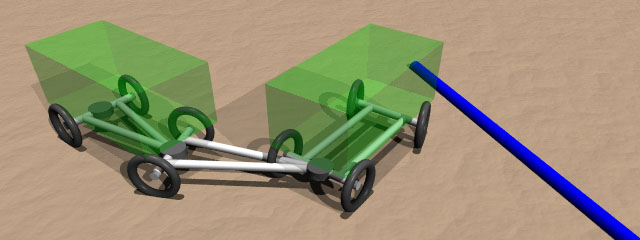
 truck-and-trailer problem Back to raytracing page |
It was a really interesting theme. So many thanks to Thomas who had the idea of it all and greetings to all the other ones in this discussion. Please excuse the
truck driving 'into' the pole - this model does not have a collision-detection
or any angle limits. |
|
||||||||||||
the mathematical model |
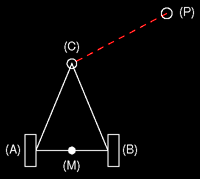
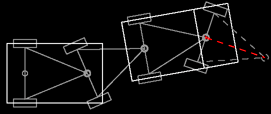
Let's build a simple trailer with a single axle and a triangle to the front where it can be pulled by hand. In the following, this simplest trailer will be called 'pole' because we only need to describe the length of it for our model. The width of the axle does not affect the behavior. In the drawings, every
pole has a back axle (AB) orthogonal to the pole's direction, a link at
the front where to pull it (C) and one at the back (center of the axle
(M)) where we can connect the next pole. This will be the origin of the
pole's coordinate system.
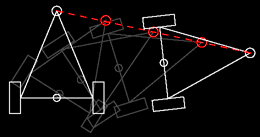
Here are the rules this pole can be moved without hurting physics:
To get a smooth and natural movement, we have to turn, move, turn, move, turn, move... several times until we are there.
|
|
||||||||||||
|
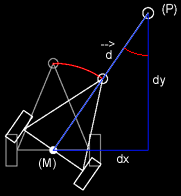
All we have to know to get the new position of the pole are the current position of the pole's origin (M) and the length of the pole. And, of course, the new position where the link shall be (P). In the following, we use the variables 'PosX, PosY' for (M), 'NewX, NewY' for (P), 'Length' for the trailer's length and 'Angle' for the target angle.
All we have to do now is to draw a model of our pole (with the model's origin at (M)), turn it by 'Angle' and move it to 'PosX, PosY'.
|
|||||||||||||
|
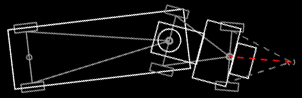
With the combination of several poles we can build any vehicles from cars to truck trains. The first pole follows the path, the second follows the origin of pole #1, the third follows the origin of pole #2 and so on... Note that the construction of a simple car already needs two poles: the first one is invisible and describes the point the driver is aiming at (see the red line). We can use the angle of this invisible pole to draw realistic steering front wheels - which will be implemented in POV below. Here are some vehicles that can easily be build with this model:
|
|||||||||||||
|
flash simulation |
|
|||||||||||||
|
|
#macro driveTo (Pole, NewX,NewY)
//get the vector [axle --> new position] // Then we have to define the pole array: #declare Poles=2; #declare
PosX=array[Poles] #declare
PosX[0]=10; #declare
PosX[1]=0; // Calling the macro (pole #0 follows the actual path coordinates, pole #1 follows the origin of pole #0 and so on...) looks like this: //defining
any target driveTo
(0,PathX,PathY) // Now, the arrays contain the actual position and angle of each pole and we can do the drawings. On the x-z-plane (a simple white box, 1 unit wide (x-direction), 2 units high (y-direction) and with the defined length(z-direction)) this will look like the following code: #declare
Pole=0; #declare
Pole=1;
|
|||||||||||||
|
For a fully functional POV animation we need a little more:
All of this is solved and commented in the POV-source to the right. Render it as an animation with 100 frames and a clock from 0 to 1 and you will get the following:
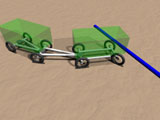
QuickTime movie (320x240, 4 secs, 471k) An interesting thing: the truck was never told to drive backwards and turn around. The only rule was to follow the blue line to the right. Uncommenting the red arrow of pole #0 in the source code will help you to understand this behavior...
|
|||||||||||||
| related links |
|
|||||||||||||
|
 |